


AlphaFox CLI
The AlphaFox CLI (command alphafox) lets your own AI agent or your terminal call the AlphaFox public application API, for example to list strategy templates, run backtests and manage strategies. It ships with a set of Agent Skills that tell an agent which operations exist and what each one takes. The CLI is open source and published on npm as @alphafox/cli.
The same entry in the web app: in the console sidebar, click Install AlphaFox and switch to the CLI tab.
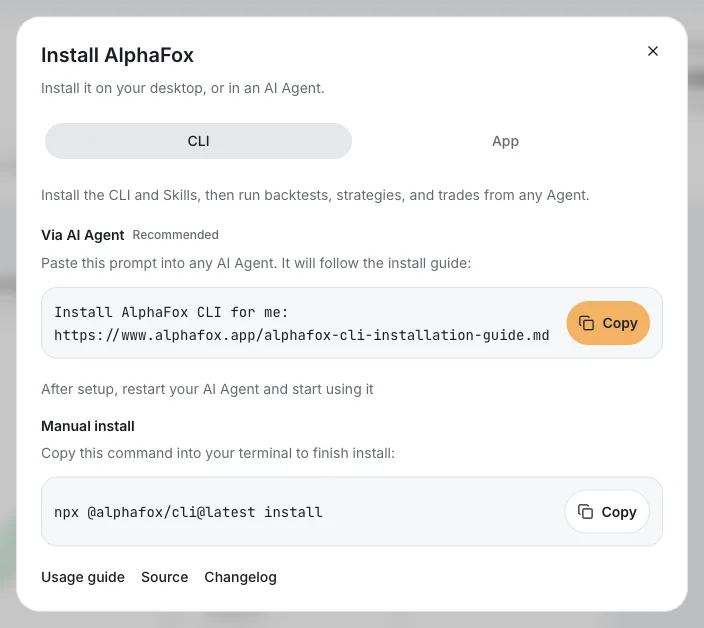
Install
You need Node.js 20 or later. Both methods install the CLI and the Skills together; pick one.
With an AI agent (recommended)
Send this to an AI agent such as Claude Code, Cursor or Codex:
Help me install AlphaFox CLI: https://www.alphafox.app/alphafox-cli-installation-guide.mdThe agent follows the install guide: it installs the CLI, syncs the Skills, and walks you through sign-in and a self-check. When it finishes, restart the AI tool so it loads the new Skills.
npm install -g @alphafox/cli on its own does not install the Skills. If you install that way, also run alphafox skills sync so your agent can find them.
Sign in
The CLI signs in with your AlphaFox account. It neither needs nor accepts a pasted token.
Browser on this machine
alphafox auth login --browserThe CLI opens your system browser; sign in there and confirm. If no browser opens, open the link the terminal prints.
The CLI signs in to production (production) by default.
Check the install
alphafox doctor
alphafox auth status --verify
alphafox whoami
doctor checks the Node.js version, the sign-in configuration and the system keychain; auth status --verify confirms your session is still valid; whoami shows the signed-in account. If the session has expired, sign in again as above.
Common commands
| Command | What it does |
|---|---|
alphafox version | Show the CLI version |
alphafox doctor | Check the environment and sign-in configuration |
alphafox whoami | Show the signed-in account |
alphafox schema <operationId> | Show the parameters an operation takes |
alphafox api GET /api/v1/me | Call an allowed /api/v1/* endpoint directly |
alphafox engine-backtest help | Show how to use the local backtest commands |
alphafox skills status | Check whether Skills are missing, out of date or modified |
alphafox update --check | Check for a new version |
The CLI’s own help is the reference for each command’s full options.
Safety rules
- Sign-in tokens are kept in the system keychain. They are never written to config files and cannot be passed with
--token. - High-risk writes run only with
--yes. alphafox apireaches only the allow-listed/api/v1/*endpoints.- Before a write is sent,
--bodyor--config @fileis validated against that operation’s schema. An agent should runalphafox schema <operationId>first and never invent fields.
Orders placed through the CLI or an agent are as real as orders placed on the web: a live strategy trades with your trading account. Try it in paper trading first; see First Paper Strategy.
Update
The CLI and its Skills are released and upgraded together:
alphafox update --check
alphafox update
alphafox update upgrades the CLI, then syncs the Skills bundled with that version. Skills you have edited are kept and reported. During normal use, the CLI checks for a new version at most once every 24 hours and only prints a notice; it never upgrades itself. Restart your AI tool after upgrading.
Uninstall
Uninstalling uses a standalone script, not an alphafox subcommand. Preview what it will remove first:
curl -fsSL https://raw.githubusercontent.com/alphafoxai/alphafox-cli/main/scripts/uninstall.cjs | node -- --dry-runThen run it:
curl -fsSL https://raw.githubusercontent.com/alphafoxai/alphafox-cli/main/scripts/uninstall.cjs | node -- --yesThe script removes the globally installed CLI, the Agent Skills, local config, sign-in tokens and local backtest caches. It does not delete strategies or account data on the server, and running strategies keep running; to stop one, use My Strategies.
Related links
- Agent install guide: step-by-step install instructions written for agents
- Source code : the open-source repository for the CLI and Skills
- Releases : what changed in each version